CardShark BidBase
Programming Notes
Nelson Ford
|
This file is something of a diary of what goes into creating this program. It contains musings not suitable for the regular program doc and version files. This may be of some interest to programmers and likely no interest to anyone else. If nothing else, this file has been useful for me to refer back to so that I can recall why I did things a certain way.
You can change the size of the print in most browsers by clicking the page, holding down the Ctrl button, and turning the wheel in the middle of the mouse, if any. Contents:The OriginsI can't remember when I first started this program. In the 1980's, I wrote a Hearts card game program (CardShark Hearts), then a Spades card game program (CardShark Spades), then I started thinking about Bridge. Some of the hand evaluation routines and card display routines in the dealing module actually originated in CSHearts.I originally called this program CardShark Bridge. I brought most of the card game interface routines and hand evaluation routines over from CSHearts and CSSpades, then started work on CSBridge's bidding routines. All these years later, I am still working on the bidding, so I have dropped any aspirations for a full bridge-playing program for the foreseeable future and now just plan on releasing a bidding program which could be used by any bridge program, as well as serving as a bidding reference source. As a result, I changed the name to CardShark BidBase. The DatabaseIn CSHearts, my intention always was to add a database where algorithms for passing cards and playing would be stored. There would also be a database for keeping track of how human opponents passed and played.Surprisingly, before I got to that point, the play of the game using just its hard-coded algorithms (within the program) got good enough that it seemed a waste of time to do any more. After all, nobody wants a Hearts game which they can never beat. I think that the reason that it got so good is that in Hearts, you often get to the critical part of a game where you have to decide whether or not to take a trick or to decide which card to lead. Most people cannot remember the number of cards played from each suit. And even that is not enough. You have to remember the exact cards out because if you have a 5, say, and one card is out, you have to remember if it is higher or lower than your 5. The computer remembers this easily, but not most humans. However, bridge bidding is so complex and the limitations of hard-coded algorithms in existing program so obvious that the database approach was used from the beginning. The problem was designing a database structure which would allow any and all types of bids/conventions to be coded in. My intention was to have as many different hand definition fields as I could think of. Any which proved to be unnecessary could always be ignored or even removed. Most of the hand definition fields you see today have been there since the beginning. I have added (and deleted) some of the fields which are there for solely for purposes of viewing and editing the database. Hand-spec fields which have been added are KNR Points (now BidBase Points), Custom Points (proven useful), and Intermediates (rarely used). I have played bridge off and on for over 40 years. Even when not playing during that time, I have almost always kept studying it. Nevertheless, I am not an expert and even if I were, a bidding database should not reflect the opinions of any single player, even an expert. Early in the life of BidBase (around 2000), I went through many books, such as Mike Lawrence's books (Overcalls, Takeout Doubles, and Balancing) making entries for almost everything the books recommend. These days (around 2022), I go through each issue of ACBL's Bridge Bulletin the same way, though It's Your Call is the best source because 15+ top experts participate. So far, the fields in BidBase have proven to be adequate for entering bid specifications to match specifications and test hands from all these sources. In 2022, the BidBase database has about 130,000 entries and is about 27MB. The limit for an Access database is 2GB, which should hold around 10 million entries. Obviously, I could never make that entries manually, but I have been working on code to bid out random deals from the BB Practice prograam, and if BB does not have a bid for a particular situation, it uses Double Dummy Analysis to come up with a bid and adds that to the database. If this bid generator ever gets semi-perfected, it could generate millions of mids. Maybe even billions. Trillions? The Programming Language and Database FormatCSHearts and CSSpades were last coded in Visual Basic 3. After VB3, I quit updating to new versions of VB because the runtime module(s) got substantially bigger, and some of the routines and DLLs, including the freeware card-display DLL I was using, would no longer work in the newer VB versions.I started CSBridge in VB3 using an old database engine by the name of Btrieve. I have written many, many applications with Btrieve since the early 1980's. It is fast, bulletproof, and has some great features such as being able to do alphabetical sorts in any order of the alphabet which you specify. When WinXP came out, people using CSHearts and CSBridge had trouble getting those programs to work, so I converted CSBridge to VB6. Unfortunately, the price of the later versions of Btrieve has become astronomical and the older version does not work with VB6, so I had to pick a new database engine. I selected Microsoft Access. Access is a lot easier to use than was the old version of Btrieve which I had been using, though the lack of a specifiable alphabetical sort proved to be a problem, as I'll discuss later. Bid Order Numbers ("BON")First: Prior Bids is what BB calls the auction up to the current hand's turn to bid. Example south opens 1S, west passes, north bids 2C, and it is east's turn to bid. The Prior Bids at this point are "1S-P-2C". All entries in BB with the same Prior Bids are shown in the grids at the same time.As explained in the program docs, each bid entry is a filter for the entries which follow it (for the same set of Prior Bids). That is, it is implicit in the specs for each entry that the hand under consideration has already been deemed NOT to be of a type defined by earlier entries for the same set of Prior Bids. Therefore, it is essential that the program consider each entry in the correct order. [History of the evolution of BON's has been omitted.] Since BidBase would only be searching for a bid for one specific set of Prior Bids at a time, the Bid Order Numbers only had to keep in order the bids for a specific set of Prior Bids, rather than having one set of numbers to span the entire database. The Round and Player numbers are kept up with in separate fields. The Bid Order Number field uses 6 digits/characters for keeping the entries in the desired order for the current set of Prior Bids. BON's range from 000000 to 999999. Alphabetic characters can be used as well, but for determining order of display and use of entries, they come after digits. For example, A00000 would come after 999999. And Access does not distinguish between "a" and "A". Bid Order Numbers for Conventions Conventions not being used have a 0 in the Cnv or Sub fields and could easily be selected or deselected by double-clicking on the field at the start of any one entry for the convention. Standard American ("SA") entries are the default. If no conventional entries are activated for a set of prior bids before the program reaches a SA entry and the hand matches the specs for the entry, then the bid for that entry is used. To make this work with max efficiency, SA entries and other non-conventional entries have BON's starting with 9. Entries for conventions start with a digit 0-8. To help identify conventions, the 2nd-3rd characters in the BON usually have A-Z characters such as "0FA..." for Feature Asking 2N response to a Weak Two bid and "0OG..." for Ogust. (Note that the first character is "0" - a zero; the capital "O" is fatter.) Some conventions, like Stayman, are so common that they have BON's starting with 9 even though conventions normally start with 0-8. 08-01-2018:In 2006, I quit working on BidBase for several reasons. The main was that the idea behind BB was to allow users to enter whatever conventions/bids they wanted, but the number of serious bridge players who study and work at improving their bridge games and knowledge is extremely small. Very possibly less than a few hundred in the U.S. This raises the question of how many people would even be interested in BidBase and would take the time to learn to use it much less expend the effort to use it. Another problem is that just entering data for BidBase (specifications needed to make each possible bid) is an enormous task which is unlikely to get finished in my lifetime. Another project that I had in the backgrond in the early 2000s was writing code for natural language processing for artificial intelligence. The demand for such a program would be astronomical. So from 2006 to date (August 2018), I've spent my programming time on that project. As with BidBase, I have gotten the AI-NLP code working and am spending most of my time entering data for it. Recently something made me want to take a look at the bridge programs again, but when I did, nothing wanted to work right, mostly due to the fact that the code was written in Visual Basic 6 which Microsoft quit supporting ages ago. For example, the Microsoft grid control used to display data from the databases would not even load. And a DLL which I created to do bidding said that a file (form) was missing despite the fact that the form was compiled into the DLL. To make matters worse, I spent hours locating and scouring backups and could find no trace of such a file. Grid Control Files: The big problem with the Grid control is that VB6 couldn't find the file for it even though it was there. Making it hard to find the solution was that there are several grid controls for VB6 and I was experimenting with each and getting nowhere. I also spent a lot of time Googling and reading about other people's efforts with the same problem, finally coming across GridFix.exe which fixes the Register. After running that, Dbgrid32.ocx would load, but then it turned out that when I had loaded program code without the Grid control, VB6 substituted a Picture control for it (??) and I lost everything I had assigned to the grids and had no idea what they were. My code showed that the Grids in the BB Editor used Splits and I could not find ANY information on the Web about how to implement those in Dbgrid. The Bids table in the BidBase.mdb database has 59 columns in it but when I finally got DBGrid32 to load and deleted the Picture controls and tried to set up the grid controls, they only had 2 columns. Some people on the Web were saying how to programmatically add columns, but their solutions didn't work for me. For example, some people said that when you assign the database to a Data control then assign the Data control to a grid, it automatically added the columns and headings, but not for me. Ultimately, I had to manually add one column at a time, then go through and enter the column headings (field names) for each one. Then I removed the other 3 grid controls in the BB Editor and copied the one that I had fixed up to make 3 more grids with the columns and headings. There must be an easier way, but none surfaced in response to my research and efforts.
When I tried to load BidBaseDB.vbp, it gave an error message that frmBidBaseAnalysis.frm was missing. Even the compiled BidBaseDB.DLL gave the same message, yet the DLL worked back in 2006. Searching my multiple backups on all my hard drives and old computers did not turn up any trace of the file nor was in mentioned in any of my doc files. Fortunately, the form was not that complicated - just a list control and a couple of buttons - so I was able to reproduce it, but how it disappeared remains a huge mystery.
After getting the grids set up, I was able to get the program running, but got the above error message on the code below:
PB_Sort_Order Between ' 5' AND ' 5' _ ORDER BY Bids.Round, Bids.Player, Bids.PB_Sort_Order, Bids.Bid_Order_Number, _ BidNames.Selected, BidNames.SubCat_Selected, Bids.Pct_Used;" Data1(0).Refresh The odd thing is that qSel is empty. In fact, when this error happens, the database has not been initialized yet because LoadConfig comes first in Form.Load. This is due to the line mTwoGrids_Click which is in Sub LoadConfig which, in turn, calls b_Show_Click which tries to display the grids which, as said, have not been initialized yet. Removing the m_TwoGrids_Click line fixes that problem, but then the program advances and gets the message -- Microsoft Jet database engine cannot find the input table or query 'HandVal'. The code creating this error is: Set NewBid = New BidBaseDB.Bidder
With NewBid
.DBPathAndName = App.Path & "\" & str_Database
...
' Get bid: '
b = .Bid
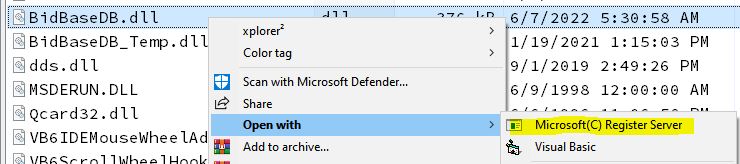
The BB Editor project needs the BidBaseDB.DLL or .VBP to look up bids, and it also requires you to explicitly select whichever one you want to use in the Projects - References menu list. I already had a BidBase_Editor.VBG, which is a VB Group which includes the BidBase_Editor.VBP (Project) and the BidBaseDB.VBP (Project). When loaded, the Bidbase_Editor line was in bold, indicating the when run, the program would start with that project, so everything looke fine, except when I tried to run the program. So I checked the References (in the Project menu) and BidBaseDB.VBP didn't appear. I browsed for it, but References would not allow adding a file with a VBP extension, despite the fact that it's been in the References list before. Another mystery brought to you by MS. So I Referenced BidBaseDB.DLL instead, but when the code reached b = .Bid, which is a call to the DLL, it bombed. So I unchecked the DLL, clicked VB6's File menu and Add Project, then loaded BidBaseDB.VBP. When I clicked on Project - References again, the VBP file was in the list. I checked it, ran the program, and everything worked and it made a bid on a Test hand. I clicked X on the Editor program to end it, but the program did not unload. I eventually had to use Task Manager to end it, and when I restarted VB6 and the program, the VBP file was no longer in the References list and nothing I could do got it there. When all else fails, reboot. Did that. Loaded BidBase_Editor.VBP into VB6. Clicked File-Add Project and could not get the BidBaseDB.VBP in the list. Then came the dawn... BidBaseDB.VBP was still highlighted because I had just loaded it. I had always assumed that the References loaded were for the whole project group, but what if they were just for the last project clicked on. So I clicked on the Editor project, clicked Projects and References, and there in the list was BidBaseDB.VBP. I put a check mark on it and the program ran fine. BUT... The next time I quit the Editor, once again the END never came about. However, this time I was able to close VB6 and it gave me a chance to save. When I restarted VB6 with the BidBaseEditor.VBG group which includes both the Editor and the BidBaseDB projects, and looked in Resources - no BidBaseDB,VBJ. I panicked for a couple of minutes and then remembered that I needed to click on the Editor.VBP name in the Project box, then checked Resources and BidBaseDB.VBP was there. Whew! Final Note: You may see two BidBaseDB lines in References. Click on them and see which is the DLL and which is the VBP. It also shows the complete path for the file in case you have multiple copies around. By the way... You cannot have two instances of the same Project loaded at the same time, and since most of the BB programs use the BidBaseDB.vbp project, only one of those programs can be loaded with that project. The other(s) must use the BidBaseDB.DLL in the Resources menu.
I haven't needed to use SendKeys in the last dozen years, but the BB Editor Tutorial uses SendKeys a lot and it is no longer supported in Win10 (for security reasons, I am told). Supposedly, there are some fixes, but these seem to have been written in the days of Windows Vista and, let's face it, not many people are still programming in VB6, it appears. Personally, I just can't justify the time it would take to learn a new language to the level of expertise I have in VB6 and then rewrite all my programs, some of which are extremely large and complex. So I'm just going to do without SendKeys. 08-11-2018:I've mostly been running the Practice program and fixing and entering bids via the Editor. One significant new feature is the ability to manually enter deals in the Practice program. This is handy for working on problem hands from books, magazines, newspaper columns, the Internet, etc. The user can enter as many hands as he wants and let the program randomly deal the remaining cards to the other hands. When entering a complete deal, the user can stop after the 3rd hand since the remaining card must all go to the 4th hand. After bidding the hands, the user can elect to have the cards in selected hands (normally the opponents' or partner's or both) reshuffled and dealt to those hands to see how the distribution of those cards affects the bidding. The BidBase Bidding Simulator can go even further by entering hands in it and letting it generate thousands of deals to see how the cards are distributed on average and thus what the hands are likely to bid. While I could have just used Text control boxes for entering hands, I'm using what I did in CardShark Spades for Android - displaying the whole deck spread out and letting the user click on the desired cards. This eliminates the need to check input for validity. To display the hands which are dealt by the program, I use the DrawCard function in the Qcard32.DLL that is included with the program. (I did not create the DLL; it is public domain.) Each card is drawn in the same Picture control and positioned in the DrawCard command where it needs to go. Rather than using that procedure for displaying the cards for the user to select when entering hands, I put 4 rows (1 for each suit) of 13 picture controls [Card(1)-Card(52)] in a Frame control (f_CardDeck). So I'm using 52 Picture controls when probably none are necessary, but the program doesn't use many resoources and I thought it would make the code simpler. A "Enter Hands" button was added. When clicked, it disappears and four buttons below it show up for indicating which hands are being given cards. See the Practice doc file for more info. 09-07-2018:I have been working daily on the programs but putting my notes in the individual documentation files or in this file.I was using the Practice program to bone up on 2-Over-1 to play with a friend and was making changes to that program at the same time. RKCB 1430 Entered: I also wanted to review Roman Key Card Blackwood 1430 but the way BidBase was designed, to create a new entry, you have to enter all the bids leading up to it. Long story, short: I simply made a prior bid of "4NT" and carried on from there. My assumption is that in the course of a regular bidding sequence, when 4NT is bid, software using BidBase will know how to call for the bid. While I was at it, I made entries from DOPI and ROPI. The same idea can be used for any other ace-asking or high cue-bidding/doubling sequence. Dec. 2020 update: I eventually used a bid format of "4N@##" for ace asking. This is explained in the doc file for the Editor - Entry Boxes. Database Updated from .MDB to .ACCDB: During my break in working on BidBase between 2006 and 2018, new releases of Access came out and in 2007, I upgraded. I was afraid that if I did this, it would break my programs which were working fine with the old format. BidBase was created with Access 1997 with the .MDB extension. I could load the database into Access 2007, but it would not allow me to change the database unless I let it update the format to .ACCDB format. I needed to make some small changes to the database structure to let me record RKCB 1430 bid entries, so I had no choice but to let Access 2007 update it. Sure enough, my worst fears were more than realized and I've spent weeks trying to get the programs to work again. In fact, it was only today that I got the Editor program to even start to run when using the new database. It kept giving me cryptic and even bogus error messages (e.g.: No SELECT [etc.] given in the RecordSource. Eventually, I created a simple test project with a single form, a grid, and a data object. I got it to work, but when I copied the RecordSource specification into the Editor properties, it would still give the same bogus errors. Next I copied the test form from into the Editor project and made it the starting form. It worked. Again, plugged its code into the Editor's form's properties, it wouldn't work. Eventually, I deleted the 5 grids and 5 data controls from the Editor's form, copied and pasted the controls from the test onto the Editor's form, and it finally worked. I'm still getting error messages related to the database later in the Editor's code, none of which make sense (telling me a table in a database is not there when it is), so it's not working yet. In the middle of this, I tried finishing up the CardShark BidBase HTML File Viewer/Editor to work with a bunch of specific bridge writing features to work, such as inserting suit symbols. Again I was running into problems which made no sense, such as two lines of HTML/CSS code which looked identical but one instance would work and the other wouldn't. This turned out in one case to be that some CSS (I think) is case-sensitive. Specifically, STYLE=... will not work. It has to be lowercase. In 30 years of making Web pages (admittedly mainly for my own use) and even longer of using programming languages, I had never (that I can recall) run into a situation where case mattered in the code itself. In another situation, it turned out a problem was caused by the order in which Project - References were listed. Again, something I had never run into or heard of before. Then after I got everything working in the HTML Editor/Viewer, I opened the Editor/Viewer's documentation file in Chrome and it didn't work. Turns out that new browsers support all of the old HTML. I finally got the HTML Editor/Viewer working, which is nice for the BidBase project which has dozens of files explaining systems, conventions, etc. All the BidBase documentation files have been uploaded to www.aeyec.com/BidBase, and as of today, I'm working full-time on trying to get the BidBase database editor to work. 09-06-2019:Wow! I really haven't been keeping up with these notes. I have mostly been making new bidding entries, but lately have made some significant changes.Bidding Practice Program: A new feature added at the bottom of the window shows the Double Dummy Analysis of the hand shown. This can be helpful in deciding how to bid and how to make entries in BidBase. 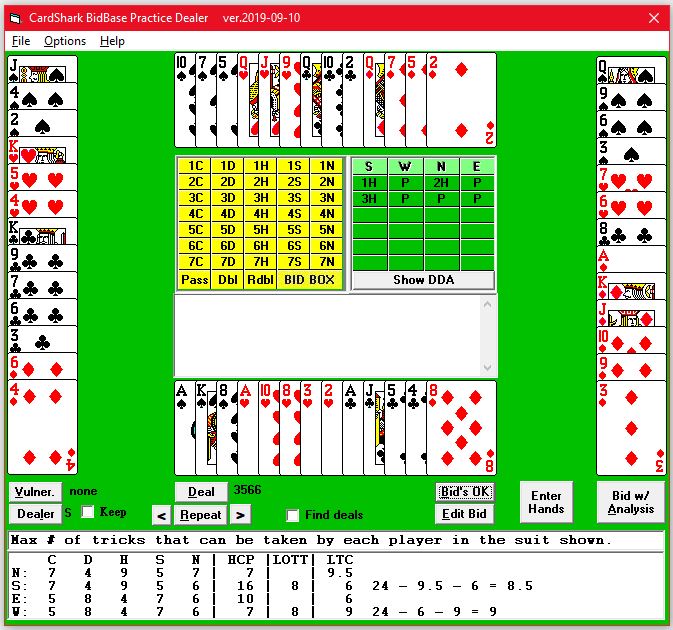 The DDA was written by Bo Haglund and can be used by programmers without charge. At first I couldn't find it on his web site, but when I emailed Bo about it, he sent me a link for downloading it. The next problem was that I could not get it to work with Visual Basic 6 which BidBase is written in. A few weeks later I stumbled across a programming blog by Tim Anderson who had the same problem but he had been able to modify the files to make it work with VB6. I posted a mesage on his blog asking about getting the fix and he sent me a link to get it. Happily, it was easy to implement and as you can see, it works fine.
A long-term goal for the practice program has been to let the user choose a convention to practice rather than just going through random deals. Many conventions come up only rarely which can make it hard to remember the bids when the need does arise. Practicing such conventions could be done in an hour or less a week. One way to do that would be to list the conventions in a menu and have a bunch of deals created for the purpose of practicing the selected convention. At least one bridge program works this way. The problems with this approach are (1) deals which are designed just for that purpose do not provide the variety of realism of randomly generated files and (2) only the conventions which are hard-coded into the program are supported. The method adopted for BidBase is to create files for conventions in which the database is searched for deals which match the auction specifications for a convention. Obviously, this does away with the disadvantages mentioned above. The first step was to provide a means for entering the auctions to search for. The combo list box shown above was actually added for that purpose and is used for DDA when not needed for finding deals. Example:
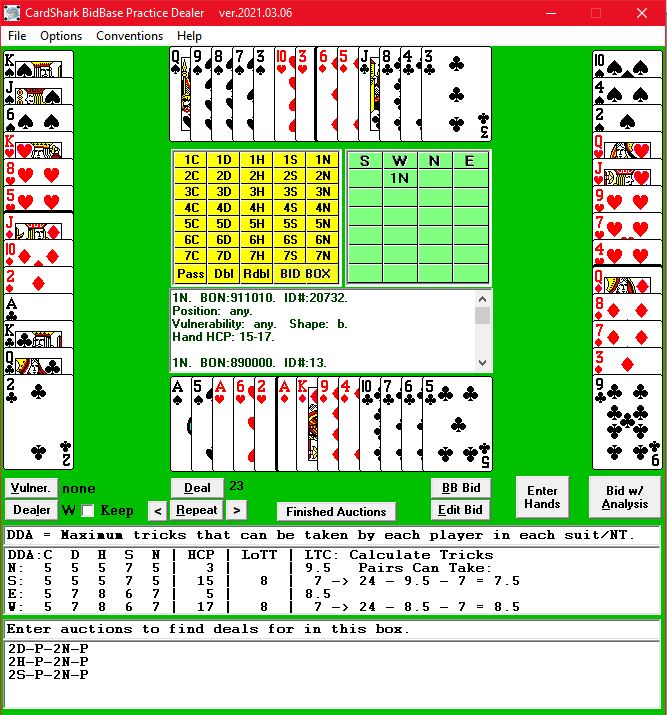 These are all the possible starting bids for New Minor Forcing. Because it can take minutes (or longer) between deals to find the next matching deal, an alternative is offered for the user to create the specified auctions and run a search during which the deal number for each matching file is saved in a file for the convention. Each stored convention has two files. The first gives the convention name followed by the specified auctions, just as they appear above. The second file contains the deal number and dealer number (S=1) for each matching deal. The first test run came up with 120 deals out of 10,000 deals checked or 1.2%, illustrating why it is better to find the matching deals in advance of using them. The reason for saving the dealer number is that a specified auction could start with any player as dealer, so we need to know who to make dealer when displaying the deal. On the other hand, it makes more sense to always have a specified auction end with East so that the user (South) is the next to bid. At first only the bidding with South as declarer was used for testing deals, but the numbers between matching files were even huger. So then a somewhat complex method was used to start with South, testing all the auctions specified, and if no matches were found, move to West as declarer, then North, and then East. This quadruples the chances of finding a matching auction in each deal. (Maybe... Math isn't my strong point.) The reason for having two files is to allow making the deal number list a random access file to make it easier when a user wants to stop after a certain deal and next time start with that deal. Each record in the file is 6 bytes - 4 for the deal number stored in n long integer and 2 for the dealer number stored as an integer. The file record in the Deals file contains the deal number in the long integer field and the record number in the 2-byte field. The two fields should point to the same deal, but it gives us something to check against. Files are given names indicating the convention, such as "New Minor Forcing", "Drury", "Bergen Raises", etc. For more information about how the practice system works, see the BB Practice documentation.
Problems Referencing BidBaseDB.vbpSometimes I have a problem with BidBaseDB while in the Editor program and sometimes while in the Practice program. In order to debug it, the program being run must Reference the .vbd file, not the .DLL file. However, the .vbd file cannot be referenced by two programs at the same time, so when it is referenced by one, the other program has to reference the .DLL file. Win10 recently did an update and that always leads to all sorts of problems in all sorts of programs, so I wasn't too surprised on 12-05-19 when I was having a problem with the DB program (DLL) while running the Practice program which was using the DLL. So I stopped the Editor program and quit that instance of VB6, then stopped the Practice program, quit that instance of VB6, and restarted it with the Practice program along with the DB.vbp program (rather than the DB.DLL). After doing that, you always have to go Project - Reference menu in VB6, uncheck the DLL and check the VBD, but VB6 told me the VBD file was missing. Normal:
Missing:
This was the same file at the same location. In all these decades, I've never had this happen before. I spent a lot of time browsing and trying and checking different setups, but to no avail. When I quit the Practice program and loaded the Editor, the same menu loaded it fine. Looks okay: But after closing the References windows, I got this...:
I next tried the old standby of rebooting Windows. and trying again. At first it didn't work, but after trying it again, it did work, so I still don't know what caused it or what fixed it. On a side note, piece of crap that VB6 is, it does not allow you to delete a line from the "Available Resources". A year or so ago when I was having an "impossible" problem, I had copied the VBP file to a temporary backup drive. After fixing the problem, I deleted the temporary backup file, yet to this day it still appears in the list and cannot be deleted. So when I got the bogus "MISSING" message, I could not delete that line either. Changes to DB in Practice not showing on Editor grids:Actually, the changes are in the Bidder DLL in Practice. The new entry shows up in Access 2007 and in the bidding in Practice, but I cannot get it to show up in Editor grid(s) when I import the same hand from Practice, even though it makes the new bid for the imported hand. Things I've tried:
It makes no sense that even restarting VB6 would not cause the entry to show in the grid. The only way I can get it to show in the grid in the Editor is to search for the new ID#, copy the entry to the Input Boxes, then save it: May 2020: Auto-Generating BidsI've always known that I could not make a database entry for every possible bid and that whatever methods which bridge game programmers are using to generate bids would have to be used for bids which cannot be found in BidBase.A year or so ago I finished making entries for over 75 conventions, which was my initial goal for BidBase, and since then I've mostly been getting the Practice program to generate bids and trying to get entries for all the bids for each deal. This is a very slow process, so recently I've been thinking about using the DDA analyzer to help compute the bidding for deals. When the Practice program generates a random deal, it computes the 10-deal DDA to determine the optimum contract for each side. It then starts calling up the bidding for each hand in order. If CSBB doesn't have a bid, the program computes one which will result in the optimum contract. November-December 2020:
I thought that if an OCR program was available, I could cut-and-paste hands and bidding from graphical displays, such as ACBL's Bulleting online and bridge columns in online newspapers.
|
.jpg)
.jpg)
.jpg)
.jpg)
 Break on all errors